
Building Argos Memory: A Lightweight Personal Memory Log & Companion
Today I want to introduce Argos Memory, an open-source, offline-first personal memory log and companion PWA. I built it to solve a bad habit of mine: taking quick pictures or jotting down notes on my phone and completely forgetting about them.
It happens all the time. Someone recommends a book at a coffee shop, I snap a photo of an HVAC filter size in our basement, or I get a vet receipt after taking my dog Harvey in for a checkup. I wanted a zero-friction place to dump those notes and photos on the go. From there, AI handles the filing, OCR, action items, and a daily morning briefing automatically.
The name Argos Memory was directly inspired by Homer’s Odyssey—specifically refreshed in my mind after watching Christopher Nolan’s The Odyssey movie this past summer. In the epic, Argos is Odysseus’ faithful hound who waited twenty years and was the only one in Ithaca to instantly recognize his master through his disguise. That steadfast loyalty felt like the right metaphor for a personal memory bank. It also fits right in with my tradition of pet-inspired project names, like Harvey Reminders for our dog Harvey, and Chesstrace and Reygent for our cats Chestnut and Rey.
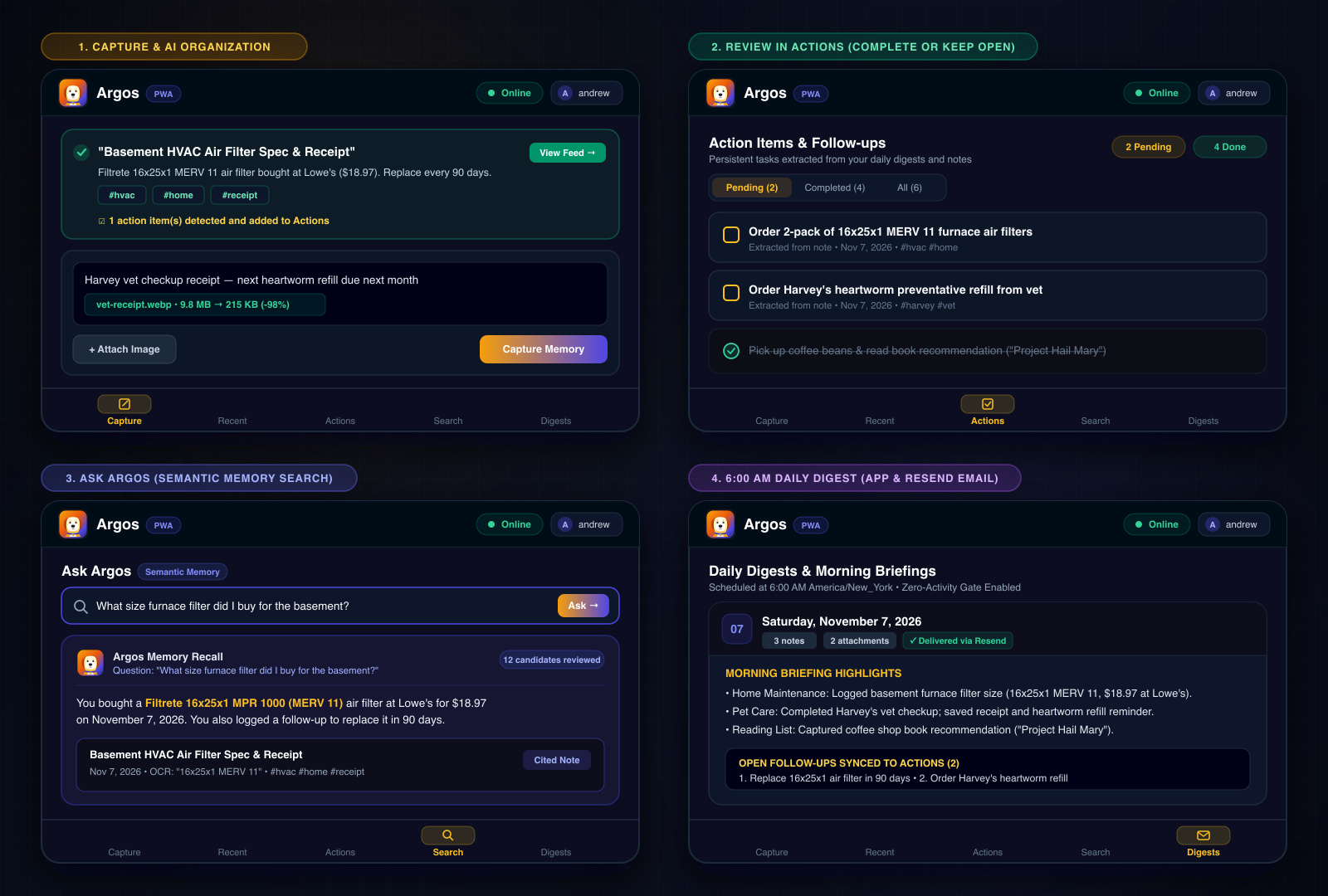
A day in the life with Argos Memory: (1) quick capture with automatic Gemini Flash OCR and tag extraction, (2) persistent follow-ups in Actions, (3) natural-language recall in Ask Argos, and (4) the 6:00 AM daily briefing.
How a Typical Day with Argos Works
In day-to-day use, the workflow stays intentionally lightweight:
- Capture a thought or image: Type a quick note, snap a photo, or paste a screenshot into the PWA. Images are compressed in the browser before upload.
- Automatic organization: Argos processes the note in the background with Gemini Flash—extracting a title, summary, OCR text, tags, and any follow-up tasks.
- Review actions or search memory: If Argos spots a follow-up item, it lands in the Actions view where I can check it off or keep it open. Whenever I need to recall something later, I can ask a plain-English question in Ask Argos and get a synthesized answer with cited notes.
- Morning digest: At 6:00 AM, Argos compiles the previous day’s notes and open follow-ups into a daily digest that I can read in the app or in my email inbox.
flowchart LR
    Capture[Capture<br/>text or image] --> Organize[Argos organizes<br/>your note]
    Organize --> Action{Action<br/>identified?}
    Action -->|Yes| Review[Review in Actions<br/>Complete or keep open]
    Action -->|No| Digest[Daily digest<br/>Notes and follow-ups]
    Review --> Digest
    Digest --> Archive[Read in app<br/>or by email]
In the rest of this post, I will cover how I put it together using React 19, Firebase, Google Gemini Flash, and Resend.
Where My Old Note Workflow Kept Failing
When I looked at why I kept abandoning notes apps, it usually came down to the same few friction points:
- Capture takes too long: If opening an app and getting to a blank text box takes more than a couple of taps, I give up. Most note apps are fine for plain text, but terrible at pulling useful data out of a quick receipt photo or handwritten note.
- Manual organizing feels like unpaid chores: Setting up nested folders, categories, and tags sounds great on day one. By week two, I’m behind, and looking at an unsorted inbox just stresses me out.
- Exact-keyword search is brittle: If I search for “furnace filter” six months later, but my original note was “bought 16x25x1 air filter at Lowe’s”, traditional text search turns up blank.
- Notes get forgotten: Most systems are passive. Unless I make a conscious effort to open the app and review notes, open loops and ideas just fade away.
To fix that, I aimed for a minimal set of requirements:
- An offline-first PWA that installs straight to my phone’s home screen.
- Fast client-side image compression so mobile uploads don’t burn data.
- Background multimodal processing using Gemini Flash to handle OCR and auto-tagging.
- Semantic search so I can ask natural questions like “What size furnace filter did I buy last year?”.
- A scheduled daily morning email summarizing anything I captured the day before.
flowchart TD
    subgraph Old ["Old Note Workflow (Where It Kept Failing)"]
        direction TB
        O1[Idea or Receipt on the Go] --> O2[Friction: Multi-tap UI & Slow Load]
        O2 --> O3[Filing Chores: Manual Folders & Tags]
        O3 --> O4[Brittle Search: Unindexed Photos & Missed Keywords]
        O4 --> O5[Dead Vault: Notes Forgotten & Abandoned ❌]
    end

    subgraph Argos ["Argos Memory Lifecycle (Zero Friction)"]
        direction TB
        A1[Idea or Receipt on the Go] --> A2[Instant Capture: Offline PWA & Local IndexedDB]
        A2 --> A3[Client Compression: OffscreenCanvas WebP]
        A3 --> A4[AI Enrichment: Gemini Flash OCR & Auto-Tagging]
        A4 --> A5[Active Recall: Natural Language Search & 6 AM Digest 🐕]
    end

    Old -.->|Replaced by| Argos
High-Level Architecture
I wanted this to be simple to maintain, cheap to run, and serverless. Everything is built around Firebase (Firestore, Cloud Functions v2, and Storage), an offline React 19 PWA, and Gemini Flash for the AI heavy lifting.
flowchart TD
    subgraph Client ["Client (React 19 PWA)"]
        UI[PWA Interface & Argos Mascot]
        Worker[Workbox Service Worker & IndexedDB]
        Compress[OffscreenCanvas WebP Compression]
    end

    subgraph Firebase ["Firebase / GCP Cloud Services"]
        Auth[Firebase Auth]
        FS[(Cloud Firestore)]
        Storage[(Cloud Storage)]
        FnProcess[Cloud Function: processMemory]
        FnDigest[Cloud Function: sendDailyDigest]
        Scheduler[Cloud Scheduler]
    end

    subgraph External ["AI & Delivery"]
        Gemini[Google Gemini Flash API]
        Resend[Resend Email API]
    end

    UI -->|Offline Write| Worker
    Worker -->|Sync when Online| FS
    UI -->|Compress Image| Compress
    Compress -->|Upload Blob| Storage
    FS -->|onDocumentCreated| FnProcess
    FnProcess -->|Fetch Image Blob| Storage
    FnProcess -->|Multimodal Extraction / OCR| Gemini
    Gemini -->|Enriched Fields JSON| FS
    Scheduler -->|Every Morning at 6 AM| FnDigest
    FnDigest -->|Query Yesterday's Notes| FS
    FnDigest -->|Synthesize Summary| Gemini
    FnDigest -->|Send Email| Resend
The Tech Stack
- Frontend: React 19, TypeScript, Vite, Tailwind CSS, and
@vite-pwa/plugin(Workbox) for offline caching and service worker management. - Backend & Database: Firebase Authentication, Cloud Firestore (with client-side offline persistence enabled), and Cloud Storage for photos.
- Compute: 2nd Gen Cloud Functions (
firebase-functions/v2), which have fast startup times and support concurrency. - AI Processing: Google Gemini Flash (
@google/genai), which handles both multimodal image inputs and structured JSON extraction quickly and cheaply. - Email: Resend for sending the morning digest.
1. Quick Capture & Compressing Images on the Client
If you take a photo on a modern phone, you’re usually dealing with an 8MB to 14MB file. Trying to upload that over a shaky cell connection in a store parking lot is frustrating, slow, and burns unnecessary bandwidth and cloud storage.
Before any image gets uploaded from Argos, it runs through a quick in-browser canvas utility. It normalizes the dimensions down to a maximum of 1600px and converts it into a lossy WebP image at 0.8 quality.
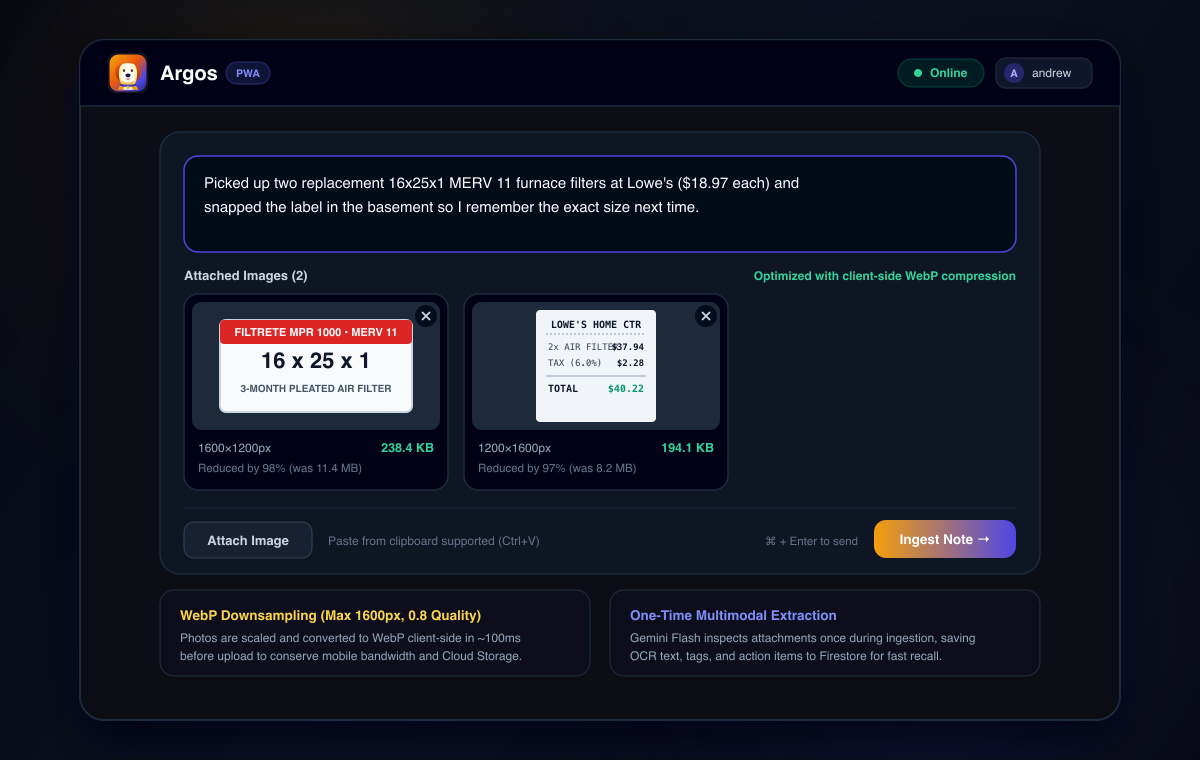
Attaching photos in Argos Memory: high-resolution phone photos are downsampled to 1600px WebP in the browser, cutting file size by 97–98% before upload.
Here is the helper function I use in the app:
// src/lib/compressImage.ts
export async function compressImage(file: File, maxDimension = 1600, quality = 0.8): Promise<Blob> {
  // If it's not an image, leave it alone
  if (!file.type.startsWith("image/")) {
    return file;
  }

  const bitmap = await createImageBitmap(file);
  let { width, height } = bitmap;

  // Scale down proportionally if needed
  if (width > maxDimension || height > maxDimension) {
    if (width > height) {
      height = Math.round((height * maxDimension) / width);
      width = maxDimension;
    } else {
      width = Math.round((width * maxDimension) / height);
      height = maxDimension;
    }
  }

  const canvas = new OffscreenCanvas(width, height);
  const ctx = canvas.getContext("2d");
  if (!ctx) {
    throw new Error("Unable to get 2D canvas context");
  }

  ctx.drawImage(bitmap, 0, 0, width, height);

  return await canvas.convertToBlob({
    type: "image/webp",
    quality,
  });
}
This consistently shrinks a 10MB phone photo down to around 200–300 KB in about 100 milliseconds right in the browser.
Once compressed, Firestore writes the document straight to local IndexedDB. Even if my phone has no service or drops offline, the UI updates instantly with a small pending-sync badge, and the sync completes quietly whenever connectivity returns.
2. Background Multimodal Processing with Gemini Flash
Once a new memory document and its optional image hit Firestore, a 2nd Gen Cloud Function fires to process it.
Instead of stringing together separate services for OCR, receipt parsing, and text tagging, I pass the note text and the image directly to Gemini Flash using its structured JSON output mode.
Here is what that Cloud Function looks like:
// functions/src/processMemory.ts
import { onDocumentCreated } from "firebase-functions/v2/firestore";
import { getStorage } from "firebase-admin/storage";
import { getFirestore } from "firebase-admin/firestore";
import { GoogleGenAI, Type } from "@google/genai";

const ai = new GoogleGenAI({ apiKey: process.env.GEMINI_API_KEY });
const db = getFirestore();

export const processMemory = onDocumentCreated(
  {
    document: "users/{userId}/memories/{memoryId}",
    secrets: ["GEMINI_API_KEY"],
    memory: "512MiB",
    timeoutSeconds: 60,
  },
  async (event) => {
    const snapshot = event.data;
    if (!snapshot) return;

    const memory = snapshot.data();
    // Don't re-process if already enriched
    if (memory.aiProcessed) return;

    const parts: any[] = [];

    // If an image was uploaded, pull it from Storage and pass as base64
    if (memory.storagePath) {
      const bucket = getStorage().bucket();
      const file = bucket.file(memory.storagePath);
      const [buffer] = await file.download();

      parts.push({
        inlineData: {
          mimeType: memory.mimeType || "image/webp",
          data: buffer.toString("base64"),
        },
      });
    }

    const systemPrompt = `
      You are the extraction engine for Argos Memory. Analyze this note and any attached image.
      Extract:
      1. OCR text from signs, receipts, labels, or handwriting.
      2. A concise 1-sentence title or summary.
      3. Suggested lowercase tags.
      4. Any clear action items or tasks mentioned.
      5. Category (receipt, task, idea, reference, personal, general).
    `;

    parts.push({
      text: `User Note: "${memory.rawText || ""}"\nTimestamp: ${memory.createdAt.toDate().toISOString()}`,
    });

    try {
      const response = await ai.models.generateContent({
        model: "gemini-2.5-flash",
        contents: parts,
        config: {
          systemInstruction: systemPrompt,
          responseMimeType: "application/json",
          responseSchema: {
            type: Type.OBJECT,
            properties: {
              title: { type: Type.STRING },
              summary: { type: Type.STRING },
              ocrText: { type: Type.STRING },
              tags: {
                type: Type.ARRAY,
                items: { type: Type.STRING },
              },
              actionItems: {
                type: Type.ARRAY,
                items: { type: Type.STRING },
              },
              category: {
                type: Type.STRING,
                enum: ["receipt", "task", "idea", "reference", "personal", "general"],
              },
            },
            required: ["title", "summary", "tags", "category"],
          },
        },
      });

      const extracted = JSON.parse(response.text || "{}");

      // Update the document with enriched metadata
      await snapshot.ref.update({
        title: extracted.title,
        summary: extracted.summary,
        ocrText: extracted.ocrText || null,
        tags: extracted.tags || [],
        actionItems: extracted.actionItems || [],
        category: extracted.category,
        aiProcessed: true,
        processedAt: new Date(),
      });
    } catch (err) {
      console.error("Failed to process memory with Gemini:", err);
      // Mark it so the UI knows processing failed, but don't lose the original note
      await snapshot.ref.update({
        aiProcessed: true,
        processingError: true,
      });
    }
  }
);
Why I Prefer Extracting at Write Time
A lot of AI workflows try to run RAG or search over raw, unindexed files on the fly. In my experience, doing that over personal photo notes is slow and wastes API calls.
Doing the extraction once right when the note is created has a few big advantages:
- Photos of receipts immediately turn into searchable store names, dates, and line items.
- Firestore’s built-in queries can easily filter by
category,tags, or dates. - Later search queries only need to scan lightweight text records instead of parsing images every time.
3. Natural Language Recall
When I need to look something up from a few weeks or months ago, I usually don’t remember the exact day I logged it. I just remember what I was doing:
- “Where did I park when I drove to Philadelphia?”
- “What medicine did the vet give Harvey last month?”
- “What was the model number on the refrigerator water filter?”
To support natural questions like that, I wrote a simple callable Cloud Function. It pulls recent memories for context and asks Gemini Flash to find the answer and cite the specific memory:
// functions/src/askArgos.ts
import { onCall, HttpsError } from "firebase-functions/v2/https";
import { getFirestore } from "firebase-admin/firestore";
import { GoogleGenAI } from "@google/genai";

const ai = new GoogleGenAI({ apiKey: process.env.GEMINI_API_KEY });
const db = getFirestore();

export const askArgos = onCall({ secrets: ["GEMINI_API_KEY"] }, async (request) => {
  if (!request.auth) {
    throw new HttpsError("unauthenticated", "You must be logged in to search.");
  }

  const query = request.data.query;
  const userId = request.auth.uid;

  // Grab the latest 100 enriched entries
  const snapshot = await db
    .collection(`users/${userId}/memories`)
    .orderBy("createdAt", "desc")
    .limit(100)
    .get();

  const contextList = snapshot.docs.map((doc) => {
    const data = doc.data();
    return {
      id: doc.id,
      date: data.createdAt?.toDate?.()?.toISOString()?.split("T")[0],
      title: data.title,
      summary: data.summary,
      text: data.rawText,
      ocr: data.ocrText,
      tags: data.tags,
    };
  });

  const prompt = `
    You are Argos, a personal memory assistant.
    Answer the user's question based strictly on these memory entries.
    If you find the answer, cite the memory ID. If the answer isn't in the entries, say you don't recall it.

    Memories:
    ${JSON.stringify(contextList)}

    Question: "${query}"
  `;

  const result = await ai.models.generateContent({
    model: "gemini-2.5-flash",
    contents: [{ text: prompt }],
  });

  return {
    answer: result.text,
  };
});
Because Gemini Flash has a huge context window and runs very fast, bundling the text of recent entries into the prompt takes less than a second and costs virtually nothing.
4. The Daily Morning Digest via Resend
I really like having my morning coffee and checking email before getting into work. I knew if Argos was just an app sitting on my phone screen, I would eventually forget to look at it.
To keep things visible, I set up a scheduled Cloud Function that runs every morning at 6:00 AM using Cloud Scheduler and Resend.
sequenceDiagram
    autonumber
    participant S as Cloud Scheduler (6:00 AM)
    participant F as Cloud Function (sendDailyDigest)
    participant DB as Cloud Firestore
    participant G as Gemini Flash
    participant R as Resend API
    participant M as Inbox

    S->>F: Trigger scheduled run
    F->>DB: Query entries created in past 24 hours
    alt No memories logged yesterday
        F->>F: Exit early (don't send empty email)
    else Memories exist
        F->>G: Generate brief summary and pending tasks
        G-->>F: Formatted HTML summary
        F->>R: Send email via Resend
        R-->>M: Deliver morning digest
    end
Don’t Send Yourself Spam
One rule I stuck to: don’t send empty emails. If I didn’t log any receipts, thoughts, or pictures yesterday, I don’t want a useless notification cluttering my inbox saying “You logged 0 items.”
We check that right away in the scheduled function:
// functions/src/dailyDigest.ts
import { onSchedule } from "firebase-functions/v2/scheduler";
import { getFirestore } from "firebase-admin/firestore";
import { GoogleGenAI } from "@google/genai";
import { Resend } from "resend";

const db = getFirestore();
const ai = new GoogleGenAI({ apiKey: process.env.GEMINI_API_KEY });
const resend = new Resend(process.env.RESEND_API_KEY);

export const sendDailyDigest = onSchedule(
  {
    schedule: "0 6 * * *",
    timeZone: "America/New_York",
    secrets: ["GEMINI_API_KEY", "RESEND_API_KEY"],
  },
  async () => {
    const yesterday = new Date(Date.now() - 24 * 60 * 60 * 1000);
    const usersSnapshot = await db.collection("users").get();

    for (const userDoc of usersSnapshot.docs) {
      const user = userDoc.data();
      const userId = userDoc.id;

      // Query notes from the past 24 hours
      const memoriesSnap = await db
        .collection(`users/${userId}/memories`)
        .where("createdAt", ">=", yesterday)
        .orderBy("createdAt", "asc")
        .get();

      // If nothing was captured yesterday, just skip it
      if (memoriesSnap.empty) {
        continue;
      }

      const memories = memoriesSnap.docs.map((d) => d.data());

      const prompt = `
        Create a concise morning summary for the user based on these notes from yesterday.
        Format cleanly in simple HTML suitable for an email.
        Include:
        - A brief 1-line hello.
        - Highlights: main moments or notes captured.
        - Open action items: any tasks that were noted.
        - Quick numbers or specs (if receipts or dimensions were captured).

        Entries from yesterday:
        ${JSON.stringify(memories)}
      `;

      const aiResponse = await ai.models.generateContent({
        model: "gemini-2.5-flash",
        contents: [{ text: prompt }],
      });

      const emailHtml = `
        <div style="font-family: -apple-system, BlinkMacSystemFont, 'Segoe UI', Roboto, sans-serif; max-width: 580px; margin: 0 auto; color: #1e293b; line-height: 1.5;">
          <h2 style="color: #0f172a; margin-bottom: 4px;">☀️ Your Argos Morning Briefing</h2>
          <p style="color: #64748b; font-size: 14px; margin-top: 0;">What you captured yesterday</p>
          <hr style="border: none; border-top: 1px solid #e2e8f0; margin: 16px 0;" />
          ${aiResponse.text}
          <div style="margin-top: 28px; font-size: 12px; color: #94a3b8; text-align: center;">
            Argos Memory
          </div>
        </div>
      `;

      await resend.emails.send({
        from: "Argos <briefing@yourdomain.dev>",
        to: user.email,
        subject: `Argos Briefing: ${memories.length} item${memories.length === 1 ? "" : "s"} logged yesterday`,
        html: emailHtml,
      });
    }
  }
);
Getting a quick email with my coffee listing yesterday’s receipts and pending tasks makes it super easy to remember what I need to follow up on.
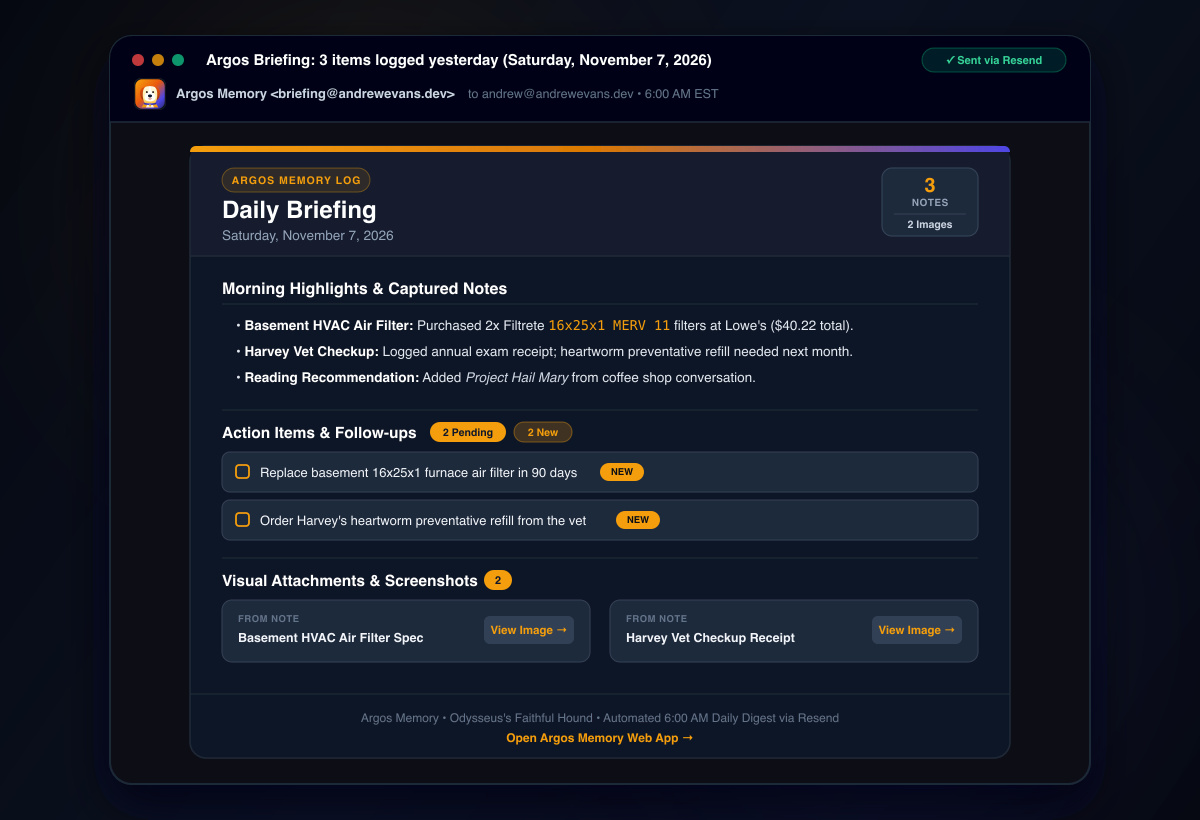
The 6:00 AM Argos Morning Briefing email delivered via Resend, summarizing captured notes, open action items, and visual attachments.
Keeping It Cheap and Reliable
With side projects, the last thing you want is a surprise bill at the end of the month for an app only you are using.
Argos runs entirely on free or near-zero tiers:
- Client WebP compression cuts image file sizes down by ~90%, keeping Cloud Storage and bandwidth usage negligible.
- Gemini Flash is fast and costs just a few cents per million tokens, making individual extraction calls cost practically nothing.
- Firestore with offline persistence caches reads locally in IndexedDB, keeping database document reads low.
- Cloud Functions v2 scale to zero when idle, so there is no running server cost.
- Resend has a generous free tier that easily handles personal daily digest emails.
Handling Network Drops
When you’re out walking or running in areas with spotty cell coverage, network requests will fail.
Firestore’s offline support takes care of the note text automatically. For image attachments, if the storage upload fails, the app sets a local flag (uploadPending: true) and retries once navigator.onLine fires again. If the Gemini API call ever runs into an error, the function flags the document without dropping the raw note. That way, I can tap a quick “Retry AI Extraction” button later without losing anything.
What Worked & What’s Next
Building this has been a really fun weekend project, and it genuinely solved my bad habit of losing track of quick notes. A few practical takeaways from building it:
- Structured Outputs are great: Using
responseSchemawith Gemini Flash completely solves the headache of models wrapping JSON in markdown backticks or returning slightly malformed syntax. You get clean, typed objects every single time. - Compress before uploading: Doing image resizing in an
OffscreenCanvasin the browser takes less than a blink, saves tons of storage, and makes Cloud Function runs much faster. - PWAs are great for personal tools: Building an installable app with React 19, TypeScript, and Workbox is a huge win for personal tools. You get a native-feeling mobile experience without dealing with app store packaging or review delays.
For some possible next steps, local client-side embeddings using Transformers.js for instant offline semantic search might be something fun to try out. Adding voice note transcription using Gemini’s native audio input would also be a great feature to have.
Hopefully this gives you some ideas for your own personal tools or AI side projects. If you have questions or thoughts about the setup, feel free to leave a comment in the comments section below, or reach out to me on GitHub or LinkedIn.
Comments